
To Become a Taxpayer show your patriotisms of yourself for your beloved country pakistan. If you have to apply for a job and in the requirements of that application you have to asked for NTN for begin then this article help alot. If in case you are looking the proper guide process of How to become a tax filer in Pakistan then you are on right place. This process is not completely online iris.fbr.gov.pk you have to also visit of contact to the agent in live life at their office location.
NTN registration in Pakistan
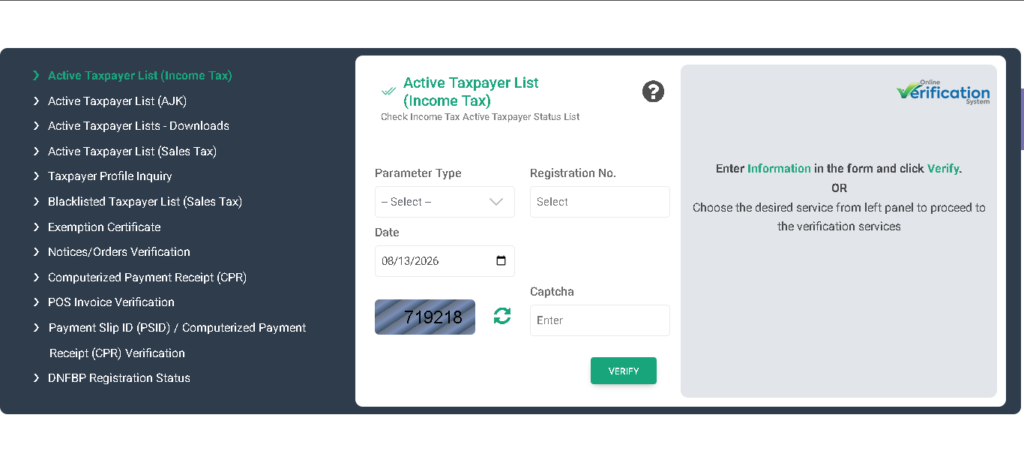
If you wish to register yourself as a Become a Taxpayer of pakistan then you want to register your identity and then you add into Active Taxpayer List (ATL). Your tax only be deducted from your account balance if you are register your self for that, this process is very important to stay safe your self and to prevent from any type of mishape from the government of pakistan.
Are You Eligible?
If you have your CNIC of pakistan then you register yourself for Become a Taxpayer registration:
- Your annual income is above the tax-free threshold set for the current tax year
- You own property, a vehicle, or run a business
- You are a company director, partner, or sole proprietor
- Your employer, bank, or a visa/tender process requires an NTN
Before You Start for Income tax registration Pakistan
Have these ready before you open the portal:
- Your original PAK Identity Card for Become a Taxpayer
- A mobile number register on your own CNIC
- An Active email address
- Your bank account IBAN
Step by Step: Register on the FBR IRIS Portal
- Firstly go to the official site of iris.fbr.gov.pk
- Then register your account with proper details for Become a Taxpayer
- You receive a OTP on your own register mobile number of your own CNIC
- You have to set your login credentials for IRIS account
- Enter your bank IBAN in the relevant field.
- At the end after proper verification you receive your own NTN
To Become an Active Filer
Registration alone does not put you on the ATL for Become a Taxpayer. Log back in to IRIS, open Declaration, select the return for the relevant tax year, fill in your income and assets, and submit. FBR refresh or update the ATL list so you have to check your list is this work properly to make sure your record in the FBR add properly without any issue.
Field by Field Guide
| Field | What to Enter | Example | Common Mistake |
|---|---|---|---|
| CNIC | 13 digits, without dashes | 3310012345671 | Adding dashes and spaces |
| Income Source | Your current income type | Job, Business, Freelance | Picking the closest option instead of the correct one |
| Address | Current residential address | House 5, Street 3, Model Town, Lahore | Using an old or parents’ address |
| Bank IBAN | Full 24-character IBAN with PK prefix | PK36SCBL0000001123456702 | Dropping the PK prefix or a digit |
Common Mistakes
- Unverified SIM: If your sim cant be verified or on your own CNIC your haven’t to use that sim number to Become a Taxpayer
- Wrong income category: For example your source of income is from Freelancing but at the time of apply your select business
- Assuming NTN equals filer status: registering gets you an NTN, not a place on the ATL. Only filing a return does that.
- CNIC formatted with dashes: Official portal only receive the number of CNIC without Dashes
After Submission
In most of cases when you verify your account you get your NTN, with a confirmation sent to your registered email. If your application needs manual review, this can take a few working days. The standard deadline for filing your annual income tax return is 30 September each year, though FBR frequently issues extensions verify before publishing the current tax year’s exact deadline on fbr.gov.pk before you publish this article.
Status Check
- SMS: You have to send your number of CNIC to 9966
- Website: go to fbr.gov.pk, open Online Verification, then Active Taxpayer List, and enter your CNIC
- IRIS portal: log in and check your taxpayer profile directly from the dashboard
If Something Goes Wrong
If you drop into an mistake which cant be handle by your side then only one option left to use and that is to contact the official side of the Department of FBR at fbr.gov.pk , and if you want to contact them directly then 051-111-772-772 this is the contact number of the official department. You can get reply as soon as possible becase this department care there clients a lot.
Official Sources
- FBR IRIS Portal: iris.fbr.gov.pk
- FBR Official Website: fbr.gov.pk
- Helpline: 051-111-772-772 / helpline@fbr.gov.pk
- Last Verified: August 2026
Frequently Asked Questions
What is the difference between having an NTN and being an active filer?
Your NTN is issued as soon as you register on IRIS it’s your tax identity. Active filer status only comes after you file at least one income tax return, at which point your name appears on the Active Taxpayer List and you qualify for lower withholding tax rates.
Can I register as a taxpayer if my income is below the taxable limit?
Yes. Voluntary registration is open to anyone with a CNIC, regardless of income.
Is there a fee to get an NTN in Pakistan?
No. NTN registration through the FBR IRIS portal is completely free.
What happens if I register but never file a tax return?
Your NTN stays valid, but you never appear on the Active Taxpayer List.
- Marriage Certificate in Pakistan 2026 | Nikah Nama and NADRA Registration Guide
- Pakistan Passport Renewal 2026 | Online Appointment and Complete Process Guide
- Birth Certificate Registration in Pakistan 2026 | NADRA and Union Council Process
- Germany Study Visa Process 2026 – for Masters Students | A Complete Procedure
- Income Tax Rules 2002 PDF Pakistan | The Rules Cover